Modern cloud-native applications need zero-downtime deployments, safe rollbacks and predictable traffic management. Amazon ECS (Elastic Container Service) now has blue/green deployments built in, tightly integrated with Elastic Load Balancing. No AWS CodeDeploy is needed: the ECS deployment controller runs the whole switch itself.
At a glance
- What: run the new version (green) next to the current one (blue), then move traffic over.
- You need: a load balancer, two target groups, a production listener rule and an ECS infrastructure IAM role.
- Configure:
strategy: "BLUE_GREEN"plus a bake time on the ECS service. - Rollback: blue keeps running during the bake time, so traffic can go straight back to it.
In this post, we’ll cover:
- What blue/green deployment is and what problems it solves
- Prerequisites for using blue/green deployments in ECS
- A TypeScript CDK example
- How traffic flows during an ECS blue/green deployment
What is blue/green deployment?
Blue/green deployment is a release strategy with two versions of your service:
- Blue is the current production version.
- Green is the new version to be deployed.
Instead of updating running tasks in place, ECS deploys the new version alongside the old one and shifts traffic when it is ready. In Amazon ECS, blue/green deployments are built from three pieces: the Amazon ECS service, Elastic Load Balancing, and an Application Load Balancer that routes the traffic.

Why use blue/green deployments?
Blue/green deployments solve several real-world production challenges:
- Zero-downtime deployments. Traffic only shifts after the new version is healthy.
- Instant rollbacks. If the green version fails, traffic can be routed straight back to blue.
- Safe production validation. You can route test traffic to green, run validation checks and monitor metrics before shifting production traffic.
- Reduced deployment risk. Instead of gradually replacing tasks, as a rolling deployment does, you switch between two isolated environments.
If green fails, traffic goes straight back to blue, which is still running.
What problems does it solve?
| Problem | Blue/green solution |
|---|---|
| Broken deployments affecting users | Traffic only shifts after validation |
| Hard-to-revert releases | Immediate traffic rollback |
| Stateful connection disruption | Controlled listener switching |
| Risky in-place upgrades | Fully isolated environments |
Prerequisites for blue/green deployment in ECS
To use AWS-native blue/green deployments with ECS, you need four things.
1. A load balancer
ECS-native blue/green works with an Application Load Balancer (ALB), a Network Load Balancer (NLB) or ECS Service Connect. This post uses an ALB, where you configure:
- A production listener
- A listener rule
- Two target groups (primary and alternate)
With an NLB there are no listener rules, so ECS switches the listener itself.
2. Two target groups
- Primary target group (blue)
- Alternate target group (green)
ECS registers the existing tasks in the blue target group and the new revision’s tasks in the green target group.
3. An IAM role for ECS infrastructure
ECS needs a special infrastructure role so it can modify load balancer rules during a deployment. AWS provides a managed policy for it: AmazonECSInfrastructureRolePolicyForLoadBalancers.
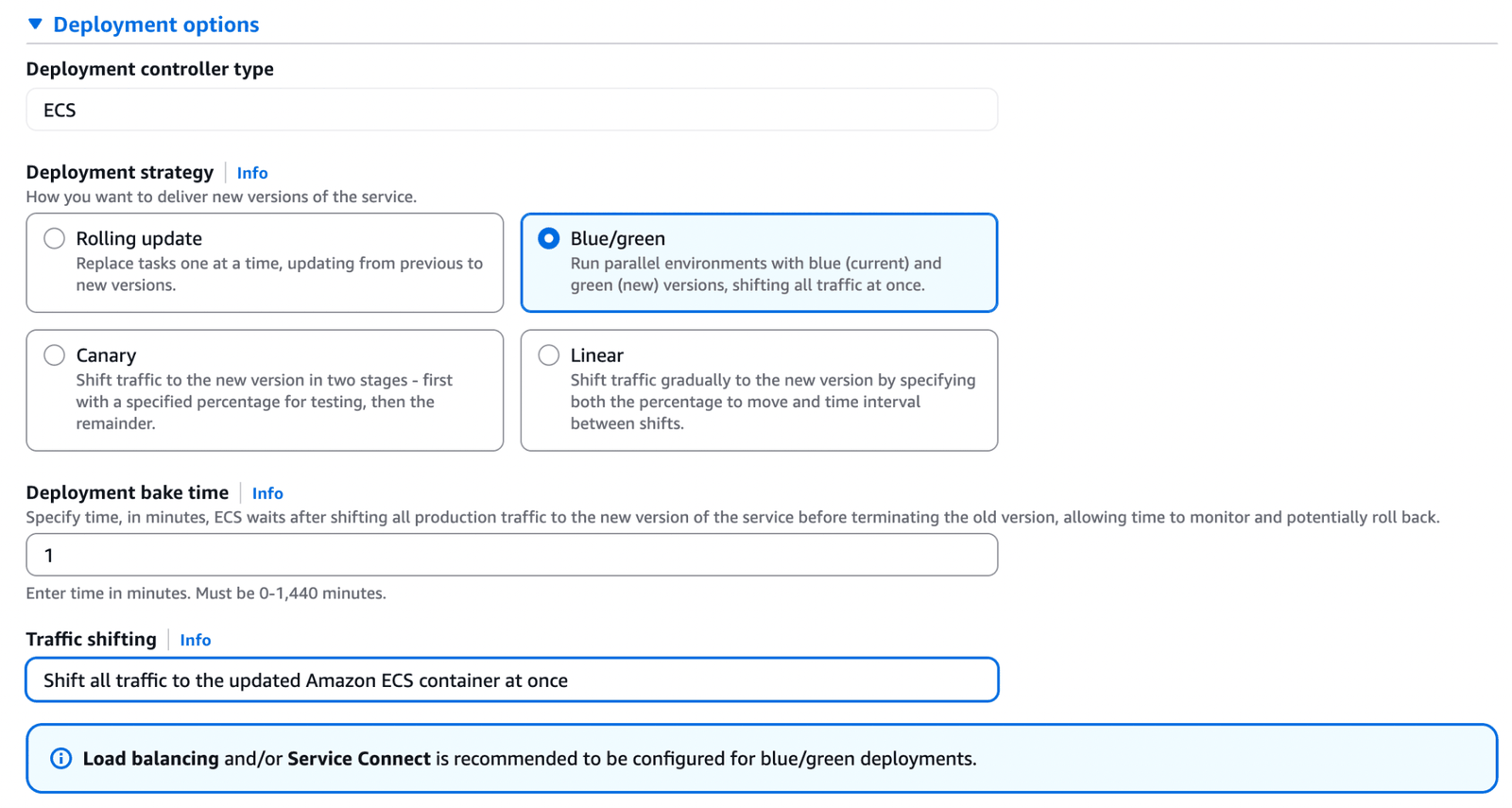
4. The blue/green deployment strategy on the ECS service
In your ECS service:
deploymentConfiguration: {
  strategy: "BLUE_GREEN",
  bakeTimeInMinutes: 5,
  maximumPercent: 200,
  minimumHealthyPercent: 100
}bakeTimeInMinutes: how long blue and green both keep running after production traffic has shifted, before blue is stopped.maximumPercent: 200: lets ECS run a full set of green tasks next to blue.minimumHealthyPercent: 100: keeps blue at full capacity until the switch.
TypeScript CDK example
The snippets below use the low-level Cfn* constructs, which map one-to-one to CloudFormation. config, app and element come from our own stack configuration (prefix, container port, health check settings); replace them with your own values. targetGroup is the service’s existing primary target group.
Step 1: Infrastructure role for blue/green
const ecsBlueGreenRole = new iam.CfnRole(this, `${config.prefix}-ecs-blue-green-role`, {
  roleName: "ecsInfrastructureRoleForLoadBalancers",
  assumeRolePolicyDocument: {
    Version: "2012-10-17",
    Statement: [
      {
        Effect: "Allow",
        Principal: { Service: "ecs.amazonaws.com" },
        Action: "sts:AssumeRole"
      }
    ]
  },
  managedPolicyArns: [
    "arn:aws:iam::aws:policy/AmazonECSInfrastructureRolePolicyForLoadBalancers"
  ]
});
Step 2: Create the alternate (green) target group
const alternateTargetGroup = new elbv2.CfnTargetGroup(this, `tg-alt-${element}`, {
  name: `tg-alt-${element}-${app.applicationTypeConfigurations.containerPort}`,
  port: app.applicationTypeConfigurations.containerPort,
  protocol: app.applicationTypeConfigurations.protocol,
  targetType: "ip",
  vpcId: cdk.Fn.importValue("outputVpcId"),

  healthCheckEnabled: true,
  healthCheckPath: app.applicationTypeConfigurations.healthCheckPath,
  healthCheckIntervalSeconds: app.applicationTypeConfigurations.healthCheckIntervalSeconds,
  healthyThresholdCount: app.applicationTypeConfigurations.healthyThresholdCount,
  unhealthyThresholdCount: app.applicationTypeConfigurations.unhealthyThresholdCount
});
Now we have:
targetGroup→ bluealternateTargetGroup→ green
Step 3: Production listener rule with weighted routing
Initially, blue gets 100% of the traffic and green gets 0%.
const listenerRule = new elbv2.CfnListenerRule(this, `blue-green-rule-${element}`, {
  listenerArn: ecsLoadBalancerListener.attrListenerArn,
  priority: 10,
  actions: [
    {
      type: "forward",
      forwardConfig: {
        targetGroups: [
          { targetGroupArn: targetGroup.attrTargetGroupArn, weight: 100 },       // Blue
          { targetGroupArn: alternateTargetGroup.attrTargetGroupArn, weight: 0 } // Green
        ]
      }
    }
  ],
  conditions: [
    {
      field: "path-pattern",
      pathPatternConfig: { values: ["/*"] }
    }
  ]
});
Step 4: ECS service with the BLUE_GREEN strategy
const ecsService = new ecs.CfnService(this, `ecs-service-${element}`, {
  cluster: cdk.Fn.importValue("outputEcsClusterName"),
  desiredCount: app.desiredCount,
  // taskDefinition, launchType and networkConfiguration omitted for brevity

  deploymentConfiguration: {
    strategy: "BLUE_GREEN",
    bakeTimeInMinutes: 5,
    maximumPercent: 200,
    minimumHealthyPercent: 100
  },

  loadBalancers: [
    {
      containerName: element,
      containerPort: app.applicationTypeConfigurations.containerPort,
      targetGroupArn: targetGroup.attrTargetGroupArn,
      advancedConfiguration: {
        alternateTargetGroupArn: alternateTargetGroup.attrTargetGroupArn,
        productionListenerRule: listenerRule.ref,
        roleArn: ecsBlueGreenRole.attrArn
      }
    }
  ]
});
How traffic flows during an ECS blue/green deployment
During a blue/green deployment with Elastic Load Balancing, traffic moves through six stages.

1. Initial state
All production traffic routes to the primary target group (blue).
2. Green deployment
ECS deploys the new tasks, registers them in the alternate target group (green) and waits for the health checks to pass.
3. Optional test traffic
If a test listener is configured, test traffic is routed to green while production users still hit blue.
4. Production traffic shift
ECS updates the ALB listener rule: blue goes to weight 0 and green to weight 100. Traffic now flows entirely to green.
5. Bake time
Both versions keep running so you can monitor logs, validate metrics and make sure there are no hidden failures. The length is set with bakeTimeInMinutes: 5.
6. Completion
After a successful bake time, the blue tasks are terminated and green becomes the new production version.
Automatic rollback
If issues are detected, ECS automatically re-routes traffic to blue and stops the green tasks, so the service stays stable. This makes blue/green one of the safest deployment strategies available in ECS.
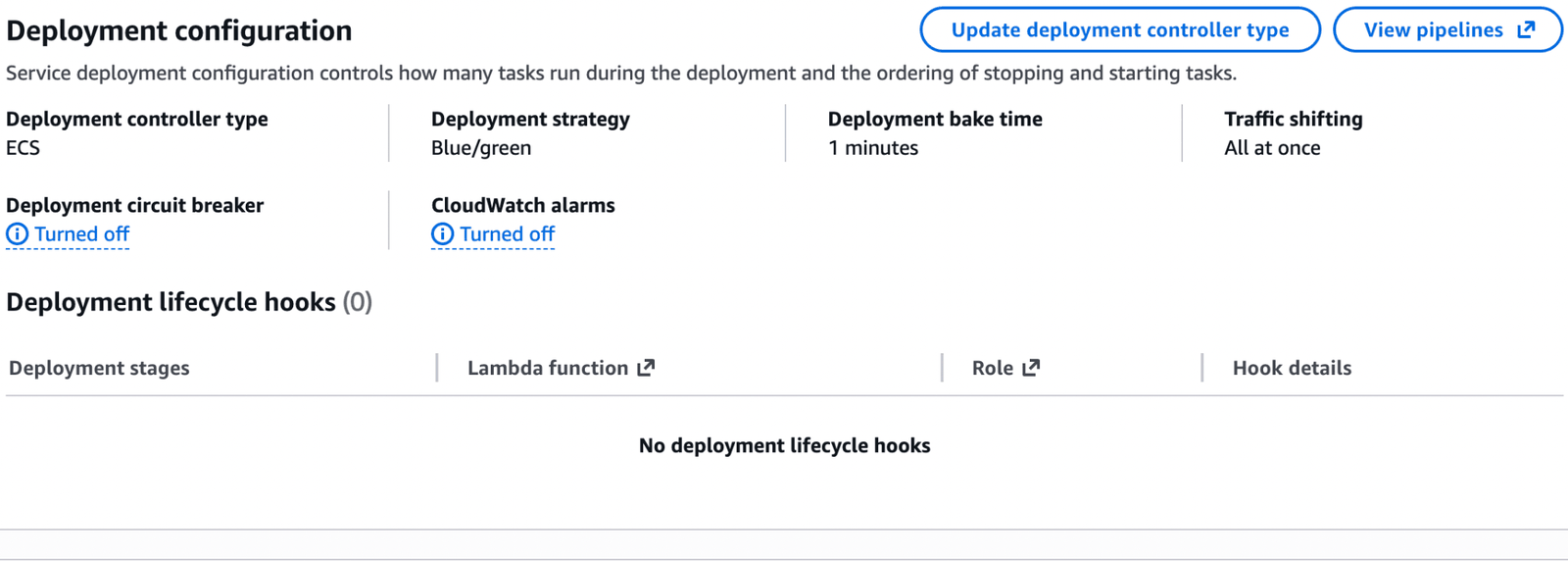
Tip: automatic rollback needs a trigger. Turn on the deployment circuit breaker and/or attach CloudWatch alarms to the service with “Rollback on failures” selected, and use lifecycle hooks (a Lambda function or a pause) to run your own checks at each stage. See the AWS documentation on ECS blue/green deployments.
Other deployment strategies in ECS
Blue/green is one of four deployment strategies you can choose for an ECS service:
- Rolling update: replaces old tasks with new ones in place.
- Blue/green: runs blue and green side by side and shifts all traffic at once.
- Canary: shifts traffic in two stages, first a set percentage for testing, then the remainder.
- Linear: shifts traffic gradually, by a set percentage at a set time interval.

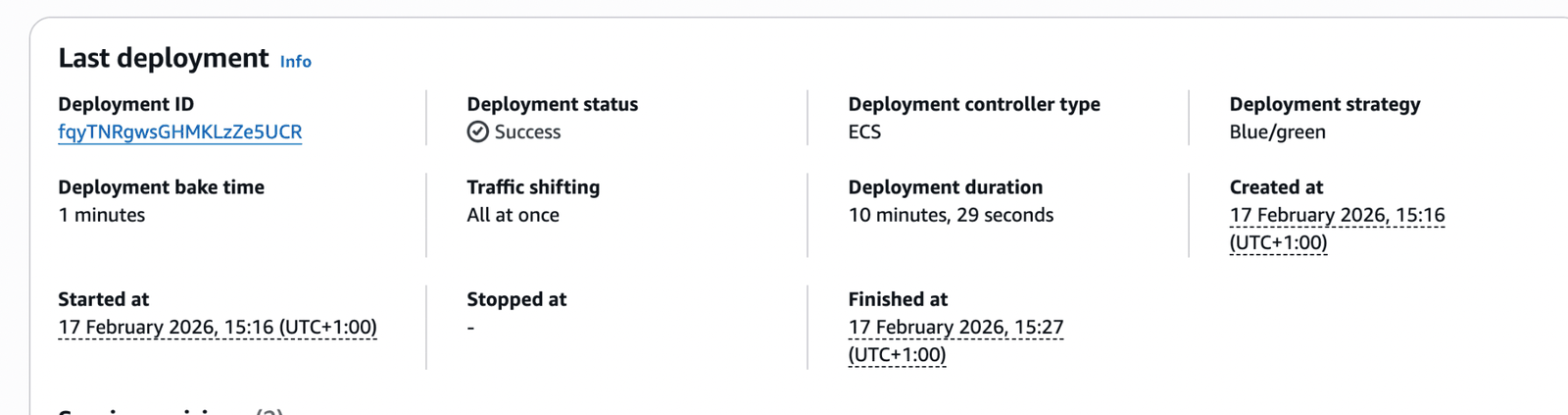
Example of a successful deployment
Conclusion
Blue/green deployment in Amazon ECS gives you:
- Safer production releases
- Instant rollback
- Zero-downtime deployments
- Full AWS-native integration
Compared to rolling deployments, it significantly reduces risk and gives teams better operational control. If you’re running production workloads on ECS with an ALB, adopting blue/green deployments is a strong reliability improvement.
Need a hand? Cloutive’s DevOps engineers and Solutions Architect set up deployment pipelines like this for our clients. See our DevOps as a Service or get in touch.